SalesFlow
Every customer interaction drives a confirmable next step
What sales teams really lack isn't more customer data — it's a more certain, executable next step. SalesFlow captures field information via voice, recordings, business cards, and visit notes; AI distills pain points and tasks; and after the rep confirms, it writes back to customers, opportunities, and approvals — turning the CRM from an archive into a sales action system.
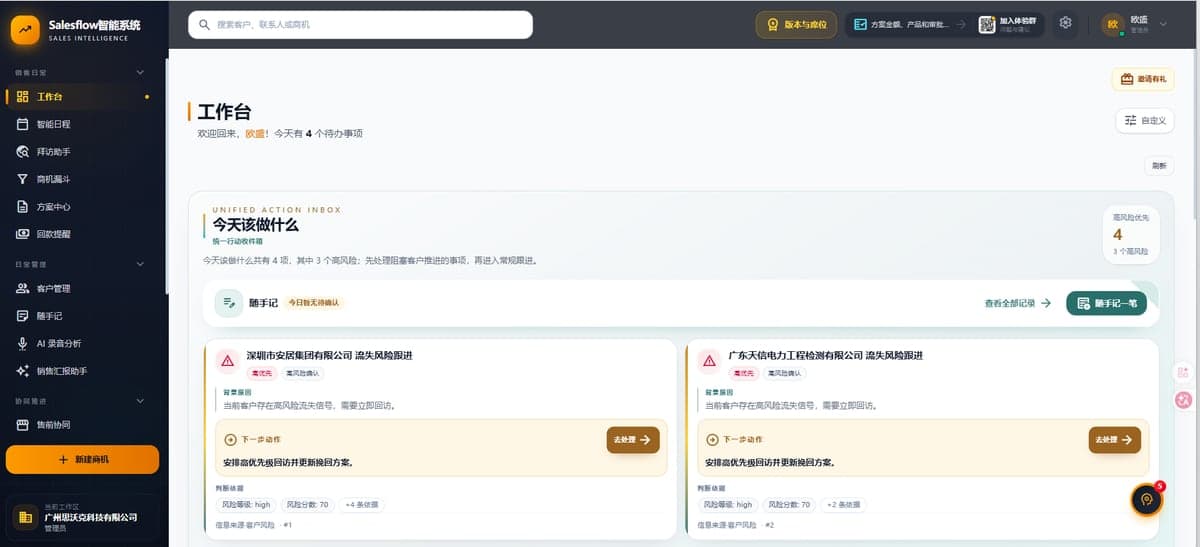
SalesFlow — Workspace
Field signals flow into one workspace; the dashboard and AI-suggested next steps stay in view.
Core Capabilities
AI that enters real sales actions, not just meeting summaries
Capture → Distill → Confirm → Write back
AI doesn't just produce meeting minutes. After voice, recordings, business cards, and visit notes are captured, AI distills pain points, budget, decision makers, tasks, and risk signals; the rep confirms or ignores each item, and only confirmed items are written back to customers, tasks, schedules, opportunities, or approvals — AI works right next to business actions while final control stays with people and the permission system.
Customers as long-term memory
Contacts, business cards, visits, pain points, budget, decision makers, and recent interactions accumulate around one customer. The next rep to take over opens the customer record and sees not a set of fields, but the full context of why this deal is where it is — memory doesn't break when people change.
Opportunity stages — and the evidence behind them
In most CRMs, 'intent/proposal/negotiation' is a rep's subjective pick that managers can't verify. Beyond stage labels, SalesFlow provides health scores, stage suggestions, key-role coverage, and change logs, so managers decide resource allocation on risk signals and evidence of action — not verbal reports.
Dual proposal flows: fast for simple, solid for complex
Running every order through one process means simple deals get slowed by approvals while complex ones lack governance. The simple flow keeps standard deals fast; the advanced flow carries multi-round review, negotiation, risk simulation, and approvals for high-value, multi-stakeholder deals. Process complexity follows deal complexity — speed and governance are no longer either/or.
The Loop
Four steps from customer interaction to sales action
Field capture
Voice, recordings, business cards, visit notes, or photos — multi-source capture in one tap
AI distillation
Automatically identifies pain points, budget, decision makers, tasks, and risk signals
Item-by-item confirmation
Reps confirm, ignore, or edit; high-risk writes never pass without a human
Write back and advance
Confirmed results flow into customers, opportunities, tasks, schedules, or approvals — moving the next step
Use Cases
Run the loop in one high-frequency scenario first, then expand
High-frequency visit teams
Frequent visits and recordings; reps spend hours organizing information and action items slip through
Complex B2B deals
High value, many stakeholders; needs presales, review, negotiation, or approval support
Team scaling and onboarding
Fast growth, wide skill gaps; top reps' experience lives in their heads
Field sales on the road
Information waits until they're back at the office; field context erodes on the road
Ready to get the sales loop running?
Pick one high-frequency scenario, bring a real visit recording or live opportunity, and we'll demo the full chain from capture to write-back.